

Physicians already work close to 58 hours a week, according to 2024 data from the American Medical Association. A growing share of those hours happens after clinic hours, with documentation that did not get finished, prior authorization requests still in queue, and inbox messages waiting for a response. The workday ends on paper, but in practice, it follows them home.
That pattern is where work-life balance for healthcare providers breaks down. Not in the operating room or during a difficult diagnosis, but in the administrative backlog that accumulates daily and has nowhere else to go. A virtual medical assistant helps doctors address that problem directly.
This blog covers what that support looks like in practice and where it makes the most measurable difference.
What is a Medical Virtual Assistant?
A medical virtual assistant is a trained remote professional who handles the administrative and operational side of a healthcare practice. They are not a general virtual assistant who manages calendars and replies to emails.
They know medical terminology, insurance workflows, EHR platforms, and HIPAA requirements, and that working knowledge is what makes the difference inside a clinical setting.
The role is different from that of a medical scribe, which is focused on real-time documentation during patient encounters. A physician virtual assistant works across the full patient visit cycle from intake and scheduling before the appointment to billing coordination and follow-ups after it closes.
For healthcare providers trying to figure out whether this kind of support fits, the question is practical: how many hours does the physician or existing staff spend each week on tasks that do not require a medical license?
In most practices, that number is higher than expected, and it is usually those hours that end up following the physician home.
What a Virtual Medical Assistant Handles Day to Day
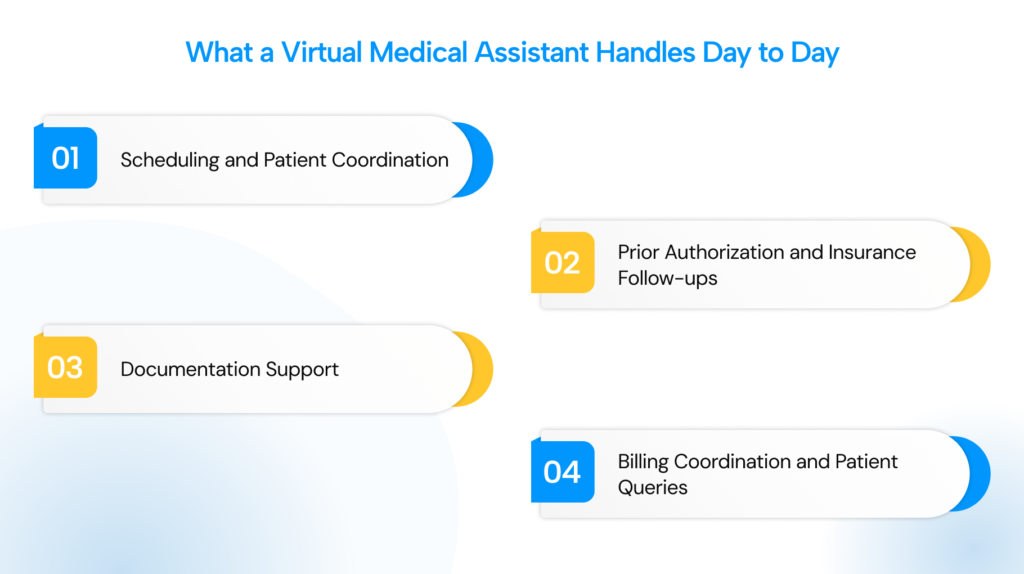
This is where how virtual assistants help doctors reduce workload becomes concrete. The role is not limited to one type of task. It spans the full cycle of what keeps a practice running.
1. Scheduling and Patient Coordination
A VMA manages appointment booking, confirmations, rescheduling, and new patient intake. They also verify insurance eligibility before visits, which prevents billing surprises at check-in and reduces the back-and-forth that slows down the front desk.
Follow-up calls after appointments fall under this, too. When these tasks are handled during clinic hours, the physician does not carry a list of pending coordination tasks into the evening.
2. Prior Authorization and Insurance Follow-ups
Prior authorization is one of the most time-consuming parts of running a practice. The AMA found that a single physician’s practice spends around 12 hours of staff time per week just on prior authorization tasks.
A VMA tracks those requests, submits them to payers, follows up on pending approvals, and flags anything approaching a deadline. The physician does not need to own any of that queue.
3. Documentation Support
VMAs with scribing training help transcribe visit notes and update EHR records based on physician dictation. The physician still reviews and signs every note.
But the time spent composing documentation drops noticeably, and for most physicians that is exactly where the after-hours work lives. When notes get handled during the day, the evening is free.
4. Billing Coordination and Patient Queries
Patient billing questions, explanation of benefits follow-ups, and coordination between front office and billing staff all fall within a VMA’s scope. They can also catch incomplete charge entries or missing documentation before a claim goes out. None of this needs to sit in a queue waiting for the physician to get to it after hours.
Medical Virtual Assistant Benefits Across Different Practice Types
The medical virtual assistant benefits for clinics, depending on its size and where the pressure points are. The same role delivers different results depending on what the practice is already struggling with.
| Practice type | Main pain point | Where VMA impact shows up |
| Solo physician | Admin falls entirely on one person | Scheduling, documentation, PA follow-up |
| Small group (2 to 5 providers) | Front desk stretched thin, billing delays | Patient coordination, billing support |
| Multi-specialty group | Authorization complexity, referral volume | PA management, payer communication |
| High-volume primary care | Admin volume per visit never lets up | Documentation, follow-up calls, referrals |
| Specialty clinic | PA complexity, referral tracking | PA workflows, referral coordination |
Across all practice types, the pattern is consistent. When administrative tasks move to a VMA, the people who were handling them, whether that is the physician or the front desk, get that time back.
For physicians, that usually means finishing the day without a backlog. For staff, it means focusing on work that actually requires them to be in the building.
The medical virtual assistant benefits for clinics also show up financially. According to a recent industry analysis, practices often underestimate the true cost of administrative hires, which can run between $60,000 and $72,000 annually. A VMA generally costs less than a full-time hire, with no onboarding overhead.
What to Sort Out Before Bringing a VMA on Board
A VMA works well when the setup is right. It does not automatically fix a disorganized workflow, but it requires one to be effective.
Before onboarding, make sure these are in place:
- Define the full scope from day one. A VMA handling only one task type rarely delivers the relief a practice is looking for. The role works best when it spans the full administrative cycle from intake and scheduling through prior authorization and post-visit follow-up.
- Build the onboarding structure before they start. VMAs need EHR access, clear communication protocols, and documented workflows for every task they will own. Without that, the first few weeks are spent re-explaining things that one written process would have resolved in an afternoon.
- Confirm HIPAA compliance before sharing any patient data. Not every VMA service trains staff on compliant data handling or operates on secure platforms. It is the practice’s responsibility to verify as it cannot be assumed.
- Evaluate domain knowledge, not just cost. A VMA unfamiliar with payer terminology, prior authorization workflows, or EHR navigation creates more work than they remove. A lower hourly rate often ends up costing more in correction time down the line.
- Set clear communication expectations. Response times, escalation paths, and how the VMA connects with in-office staff need to be defined upfront. Ambiguity here is where most onboarding friction comes from.
Conclusion
Most of what exhausts physicians is not the medicine. It is the layer of administrative work the healthcare system has gradually transferred onto their desks, with no obvious home except the physician’s after-hours time.
A virtual medical assistant helps doctors solve that problem in a practical, immediate way. It is not a policy change or a long-term systemic fix. A VMA is a trained professional handling the tasks that do not require a clinical license, so the physician can leave at the end of the day without a queue following them out the door.
If you are looking at where to start, DoctorPapers works with practices to identify exactly these gaps and build the right support around them.
Frequently asked questions
What is a medical virtual assistant, and what do they do?
A medical virtual assistant is a trained remote professional who manages administrative and clinical support tasks for a healthcare practice. Their work typically covers scheduling, prior authorization, documentation support, billing coordination, and patient follow-up. What separates them from a general virtual assistant is their familiarity with medical terminology, EHR systems, and HIPAA compliance requirements.
How does a virtual medical assistant help with work-life balance for doctors?
The connection is direct. When administrative tasks are handled by a dedicated remote professional during business hours, the physician finishes clinical work without a backlog waiting. Documentation, follow-ups, and authorization requests do not carry over into evenings. That creates a real boundary between work and personal time, which is what most physicians say they are missing.
What are the main medical virtual assistant benefits for small practices?
For smaller practices, the most immediate benefit is flexible coverage without the fixed cost of a full-time hire. A VMA handles scheduling, prior authorization, and patient coordination without salary, benefits, or training overhead.
Small practices also tend to see faster results because the administrative load usually sits on just one or two people who are stretched across too many functions.
Is a medical virtual assistant HIPAA compliant?
Compliance depends on the service provider, not the role itself. Before onboarding, practices should confirm that the service uses encrypted communication platforms, limits patient data access appropriately, and trains staff on HIPAA requirements.
How is a VMA different from an in-house medical assistant?
An in-house medical assistant works alongside the physician during patient encounters, such as handling vitals, room preparation, and chairside support. A VMA works remotely and covers the administrative cycle: scheduling, authorization, documentation, and post-visit coordination.
Both serve the practice in different ways, and some practices use both depending on their volume and needs.